PlayMMIX: MMIX in the Browser
Posted on Sat 05 September 2026 in tech
The 2ad MMIX playground, playmmix, puts an MMIX machine in your browser.
MMIX is Knuth's 64-bit RISC architecture. I built checksmix to assemble and run programs for it. playmmix wraps that same engine with an editor and a live debugger, in Rust, Yew and WebAssembly.
Editing the source re-assembles and reloads the machine at its entry point, the
same way mmixdb does. Nothing executes until you click Run.
Driving the MMIX machine
Six controls drive execution. Each button's bold amber first letter is its keyboard shortcut:
- Run (
r) starts over from the top, wherever the program is paused, and runs until it halts or hits a breakpoint. - Continue (
c) resumes a paused run in place: it executes the instruction at the PC, then runs until the program halts or hits a breakpoint. - Step (
sorF11) executes one line, following a call into the subroutine and stopping at its first line. - Next (
norF10) executes one line. On a call it runs the whole subroutine and stops at the line after the call, unless a breakpoint or halt stops it first. - Interrupt (
i) pauses a Run, Continue or Next in progress. - Reset reloads the current source, clearing output and change highlights and keeping breakpoints. It has no key.
On desktop the controls sit top left. On a phone they move to a bar pinned to the top of the screen, and on a full-screen iPad to the bottom.
Click a line number to set a breakpoint on an instruction. The machine pane highlights values that changed since the previous pause. Step once and see what moved; Run to a breakpoint and see what changed along the way.
Testing a small prime
Trial division tries D = 2, 3, 4, … against N. If D divides N, N is composite. If D * D exceeds N first, N is prime.
Paste this into playmmix:
        LOC     #100
Main    SETL    $1,97            # N
        PUSHJ   $0,IsPrime       # $0 = 1 if prime, 0 if not
        XOR     $255,$0,1        # exit 0 if prime, 1 if not
        TRAP    0,Halt,0

IsPrime CMPU    $1,$0,2
        BN      $1,NotPrime      # 0 and 1 are neither prime nor composite
        SETL    $1,2             # D
Loop    MULU    $2,$1,$1
        CMPU    $2,$2,$0
        BP      $2,Prime         # D * D > N
        DIVU    $2,$0,$1
        GET     $2,rR            # N mod D
        BZ      $2,NotPrime
        ADDU    $1,$1,1
        JMP     Loop
Prime   SETL    $0,1
        POP     1,0
NotPrime SETL   $0,0
        POP     1,0
Click Run. The program exits 0, prime: the loop tries 2 through 9 and stops at 10, since 100 exceeds 97. Change 97 to 91 and run again: it exits 1, composite, found at 7.
Comments follow Knuth's remark specification, from The Art of Computer
Programming, Volume 1, Fascicle 1,
Section 1.3.2. An MMIX statement is a LABEL, an OP and an EXPR. Everything
to the right of the EXPR is a comment unless it starts with a digit or an
operator. The # above carries no meaning; it gives the eye something
to lock on.
Following the call
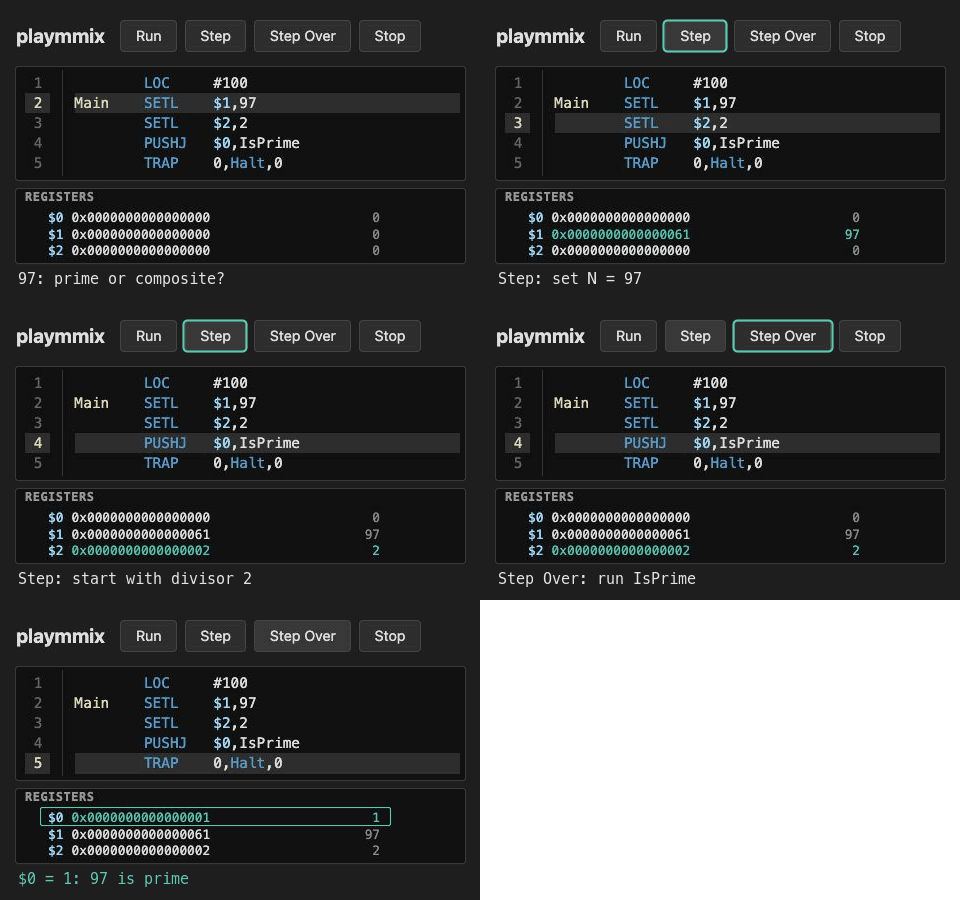
Put 97 back and click Reset. One click on Step loads N into $1. The
next instruction is PUSHJ $0,IsPrime.
Click Step again. We're at IsPrime, call depth is 1, and N is in $0.
Set a breakpoint on Loop and click Run. Run starts over from the top and
pauses at Loop; $1, which holds D, reads 2. Each Continue stops at the
next pass. D climbs and N stays put; at 10, 10 * 10 passes 97 and BP goes to
Prime.
Reset, Step once and press Next on the PUSHJ. Execution stops at
Loop, the breakpoint inside the call. Click the line number to remove the
breakpoint and Continue: IsPrime returns and the program halts. Now
Reset, Step once and press Next on the PUSHJ again. With no
breakpoint set, Next runs IsPrime to its return and pauses at the XOR with
$0 = 1.
Getting home
PUSHJ writes the return address to the special register rJ. POP 1,0
returns one value, placing the callee's $0 in Main's $0, the register its
PUSHJ named. The
MMIX instruction reference
has the full register-stack rules.
Under the hood
checksmix is the assembler and the emulator: registers, memory and TRAP
handling. playmmix uses its public MMixAssembler and MMix
APIs. The editor, execution controls and machine display live in playmmix.
Re-assembly pauses four tenths of a second after typing stops, so an unfinished line doesn't flash an error on every keystroke. Continue, Step and Next flush any pending edit before executing; Run starts over from the current source. A successful assembly starts a fresh machine.
Next single-steps the callee itself, checking the call depth after every instruction until execution returns to where it started. A breakpoint inside the callee fires under Next because Next makes the same per-instruction check as Run and Continue.
Long runs execute in bounded chunks, yielding to the browser between them. That keeps Interrupt available, including while Next is working through a call. The arithmetic runs locally in WebAssembly.
For .mmo object files or a shell, use
checksmix, also available on
crates.io. Its command-line debugger,
mmixdb, has its own worked example.
Open playmmix, paste the program and try 49. Watch which branch it takes when the divisor's square equals the number. The source is on GitHub.